
Shopify vs WooCommerce (UK): Which Is Better for a Small Business?
Shopify or WooCommerce? Compare UK costs, card fees, upkeep, SEO and dropshipping side by side, and see which one suits the way your business works.

Shopify vs WooCommerce comes down to convenience versus control. For most small UK businesses, Shopify is the better choice if you want a shop that runs with no technical upkeep, while WooCommerce is better if you already use WordPress or need custom rules, content and integrations. Card fees are close on both, so the real question is who will look after the shop and how much you want to change it.
Shopify or WooCommerce: the short answer
| Shopify | WooCommerce | |
|---|---|---|
| Software | Monthly plan, from £19 a month paid yearly | Free plugin for WordPress |
| Hosting and security | Included | You choose and pay for hosting |
| UK card fees with built-in payments | 2% + 25p online on Basic, lower on higher plans | 1.5% + 25p with WooPayments |
| Using another payment provider | Extra 0.6% to 2%, depending on plan | No extra fee |
| Upkeep | Handled by Shopify | Updates, backups and security are yours |
| Control | Within Shopify's rules and apps | Full: the code, data and hosting are yours |
| Best for | Owners with no technical help | WordPress sites, custom pricing, content-led shops |
Figures are from Shopify's UK pricing page and WooCommerce's fee schedule, checked in November 2026. The sections below explain each row.
Shopify vs WooCommerce pricing and fees
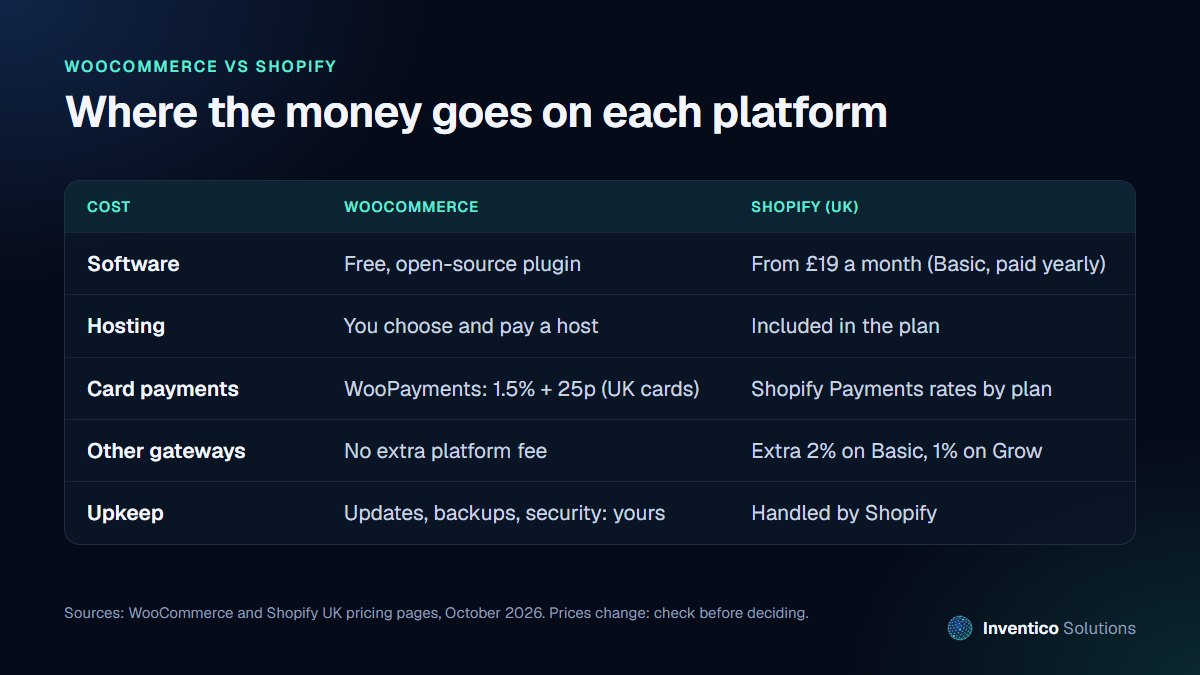
The headline prices are only part of the picture. Here is where the money actually goes.
Shopify
According to Shopify's UK pricing page, plans start at £19 a month on Basic when paid yearly (£25 paying monthly), rising to £49 on Grow and £259 on Advanced. Hosting, security certificates and platform updates are included.
The detail that catches people out is payments. If you use Shopify Payments, you pay only the card rate: 2% + 25p per online sale on Basic, 1.7% + 25p on Grow and 1.5% + 25p on Advanced. If you use another payment provider, Shopify adds a fee of 2% on Basic, 1% on Grow and 0.6% on Advanced, on top of what that provider charges.
WooCommerce
WooCommerce is a plugin for WordPress. The WordPress.org listing describes it as an open-source ecommerce platform, with a free core and more than seven million active installations. You pay instead for:
- hosting, which ranges from basic shared plans to managed WordPress hosting
- a theme, if you do not use a free one
- paid extensions for features such as subscriptions, bookings or advanced shipping
- maintenance: updates, backups and security monitoring
For card payments, WooCommerce's own gateway lists UK card fees of 1.5% plus 25p per transaction, plus 2% for international cards and another 2% when a currency is converted. You can also use other gateways, such as Stripe or PayPal, without a platform fee on top.
What it costs in practice
For a typical small shop, monthly running costs end up in a similar range on both platforms once you add hosting and extensions to WooCommerce, or apps and a higher plan to Shopify. What differs is the spread: Shopify is predictable, while WooCommerce costs depend on your hosting and how many paid extensions you need. Ask for a quote that lists every recurring cost before you compare.
On card fees alone, WooPayments is slightly cheaper than Shopify Basic for UK cards: 1.5% against 2%, both plus 25p. On £5,000 of sales a month, that half a percentage point is about £25. The gap narrows on Shopify's higher plans. If you are starting without a website, our guide to what a WordPress website costs covers the build side of a WooCommerce shop.
Also count the cost of your own time. An owner who spends two evenings a month updating plugins or fixing a broken checkout is paying for WooCommerce in hours rather than pounds. Equally, a Shopify shop that needs five paid apps to do what it should can cost more each month than a well-hosted WooCommerce site. Compare the whole picture over a year, not the price of the first month.
Which is easier to run day to day?
Shopify is the simpler of the two to run (we cover its costs in detail in is Shopify worth it for a small business). Updates, security and hosting are handled for you, and the admin is consistent across every shop. If nobody in your business wants to think about servers or plugin updates, that matters more than any feature list.
WooCommerce gives you more to look after. WordPress, WooCommerce and every extension need regular updates, and a conflict between two plugins can break checkout. Many businesses solve this with a maintenance plan, so that updates are tested before they go live. If you choose WooCommerce, budget for that care from the start.
Which gives you more control?
WooCommerce, by a distance. You own the code and the data, you choose the host, and anything can be changed: checkout steps, product rules, pricing logic, content layout. That matters if you:
- sell products with complex options, trade pricing or custom quotes
- want a content-heavy site where articles and products sit together
- need to connect to stock, accounting or delivery systems in specific ways
- want to avoid being tied to one provider's pricing decisions
Shopify is flexible through its app store and theme system, but you work within its rules. Some changes need a higher plan, a paid app or a workaround.
A quick way to decide
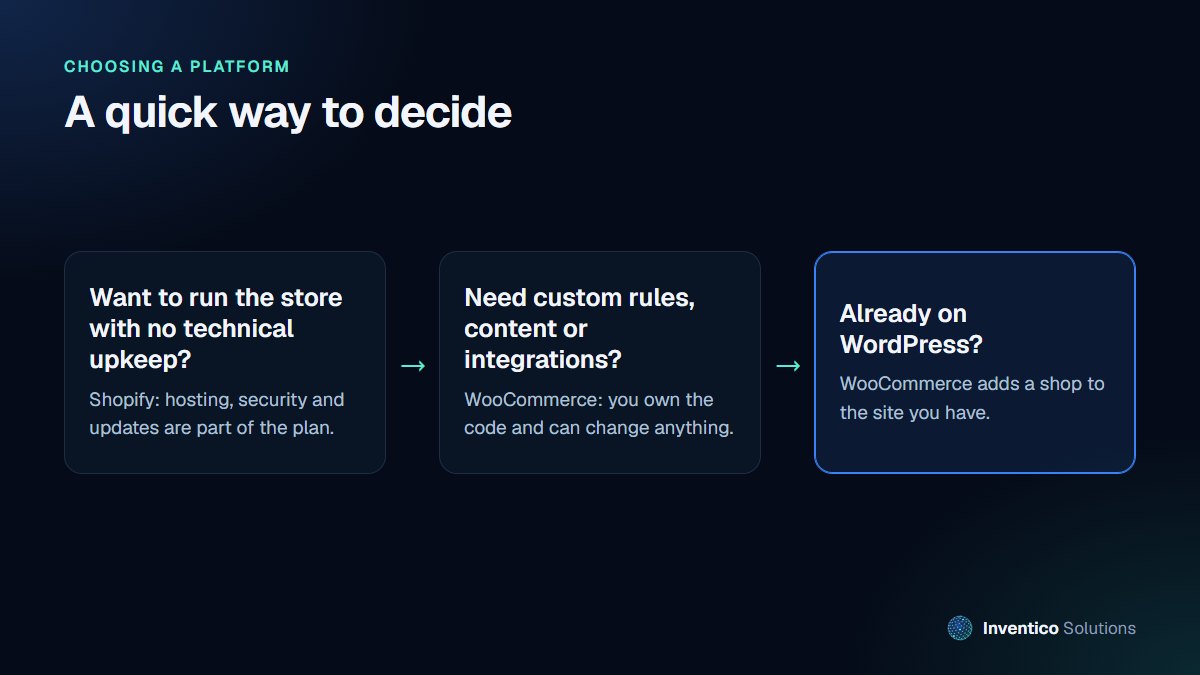
Ask three questions:
- Who will look after the shop? If the answer is "nobody technical", lean towards Shopify.
- Is anything about how you sell unusual? Custom pricing, bundles, bookings or trade accounts often point to WooCommerce.
- Do you already have a WordPress site you are happy with? Adding WooCommerce keeps one site, one login and your existing search rankings.
If you are still unsure, start with the platform that fits your next two years, not your next ten. Moving later is possible, but plan for it: products, customers and order history can be migrated, while page addresses need redirects so you keep your search traffic.
Security, backups and who is responsible
With Shopify, the platform is responsible for hosting security, server updates and keeping checkout secure. You are still responsible for staff accounts: use strong passwords, turn on two-step login and remove access for people who leave.
With WooCommerce, more of this falls to you or your developer:
- keeping WordPress, WooCommerce, the theme and every plugin up to date
- daily backups stored away from the website, tested so you know they restore
- a firewall and malware scanning on the hosting
- removing plugins you no longer use, since each one is code that needs updating
None of this is difficult with a good host and a maintenance routine, but it does need to happen every month, not when something breaks. When you compare costs, include that routine for WooCommerce, whether you do it yourself or pay someone to.
On both platforms, card details are handled by the payment provider rather than stored by your shop, which keeps most card security obligations with them.
Shopify vs WooCommerce for SEO and speed
Both platforms can rank well. Neither has a built-in search advantage that outweighs clear product names, unique descriptions, sensible categories and fast pages. The differences are in how much you can shape:
- Page addresses. WooCommerce lets you choose how product and category addresses are built. Shopify lets you edit the end of each address, but product and collection pages sit under paths Shopify sets.
- Content. WooCommerce runs on WordPress, so guides, articles and products live in one system with full control over layout. Shopify has a blog, but it is simpler. If you plan to win search traffic with helpful articles, that matters.
- Speed. Speed comes mostly from the theme, image sizes and the number of apps or plugins running, rather than the platform. A lean WooCommerce site on good hosting and a well-built Shopify theme both perform well. A shop with twenty apps or plugins will be slow on either.
Whichever you choose, the basics in our SEO-friendly website checklist apply to both.
Shopify vs WooCommerce for dropshipping
Shopify is the more common starting point for dropshipping. Supplier apps connect in a few clicks, and there is no hosting to manage while you test which products sell. That speed is worth a lot when you are still finding a product that works.
WooCommerce can run a dropshipping shop through supplier plugins, and it suits sellers who want their own checkout rules or a content-led site. You take on the upkeep, and each plugin is one more thing to keep updated.
Margins usually settle it. Dropshipping margins are often thin, so work out a year of costs on each: Shopify's plan, card rate and any extra fee for a third-party payment provider, against WooCommerce hosting, plugins and maintenance.
Frequently asked questions
01.Which is better, Shopify or WooCommerce?
Neither is better for everyone. Shopify is better for owners who want a shop that runs itself. WooCommerce is better when you need control, already run WordPress or sell in an unusual way. The three questions above settle it for most small shops.
02.Is WooCommerce cheaper than Shopify?
The software is free and UK card fees through WooPayments are lower than on Shopify Basic. Hosting, paid extensions and maintenance usually bring the monthly total into a similar range, though. WooCommerce works out cheaper when you already pay for good WordPress hosting and need few paid extensions.
03.Does Shopify charge transaction fees in the UK?
Not if you use Shopify Payments, where you pay the card rate only. If you use a different payment provider, Shopify adds 2% on Basic, 1% on Grow and 0.6% on Advanced, according to its UK pricing page.
If you would like a second opinion on which platform fits your business, or a shop built and looked after for you, see our e-commerce services or ask about managed maintenance for an existing store.


