
PHP2Shell (CVE-2026-109618): Is Your Website Affected and How to Fix It
Two critical PHP flaws found with the help of AI put most PHP websites at risk, including WordPress, Drupal and Joomla. Here is how to check yours and what to do today.

PHP2Shell is the name for two critical vulnerabilities in PHP itself, CVE-2026-109618 and CVE-2026-109619, that can let an attacker run code on a web server without logging in. If your website runs on PHP, which includes WordPress, WooCommerce, Drupal, Joomla, Magento and many custom sites, it is almost certainly affected until PHP is updated to 8.5.12, 8.4.27, 8.3.36 or 8.2.35. Update today, or take the site offline until you can.
Last checked against the official advisories on 23 October 2026. We will update this page as the advice changes.
What is PHP2Shell?
On 21 October 2026 the PHP project published a security advisory describing "two critical vulnerabilities that can allow unauthenticated remote code execution", and urged all PHP users to update immediately. Both are rated 9.2 out of 10 under CVSS v4.0.
In plain terms: an attacker can send specially crafted requests to a website and, under the right conditions, make the server run code of their choosing. They do not need a password, and nobody has to click anything.
According to Wiz Research, one of the teams that found the flaws, the bugs sit in how PHP handles fatal errors, particularly out-of-memory errors. A request that ends unexpectedly can leave corrupted internal state behind, which a later request can reuse. Because the flaw is in PHP rather than in any one application, Wiz reports that exploitation "does not depend on a flaw in the application's code", and it demonstrated attacks against the latest WordPress, Drupal and Joomla container images.
Why AI is part of the story
These are not new bugs. Wiz states that every PHP version released in the last decade is affected by at least one of them, going back to PHP 5.4. What is new is how they were found: independently, by researchers at Calif working with OpenAI, and by Wiz using its own tooling together with AI models, which also helped turn the bugs into working exploits quickly.
That speed cuts both ways. Germany's Federal Office for Information Security (BSI) warned that attackers now have AI-assisted tools to analyse patches and build exploits within a short time, and that it expected broad exploitation within hours of the patches appearing. In the US, Tenable reports that Amazon Threat Intelligence saw an exploitation attempt on 17 October, four days before public disclosure, and later described the flaws as being broadly exploited.
Is my website affected?
If your site runs on PHP and has not been updated since 21 October 2026, assume yes.
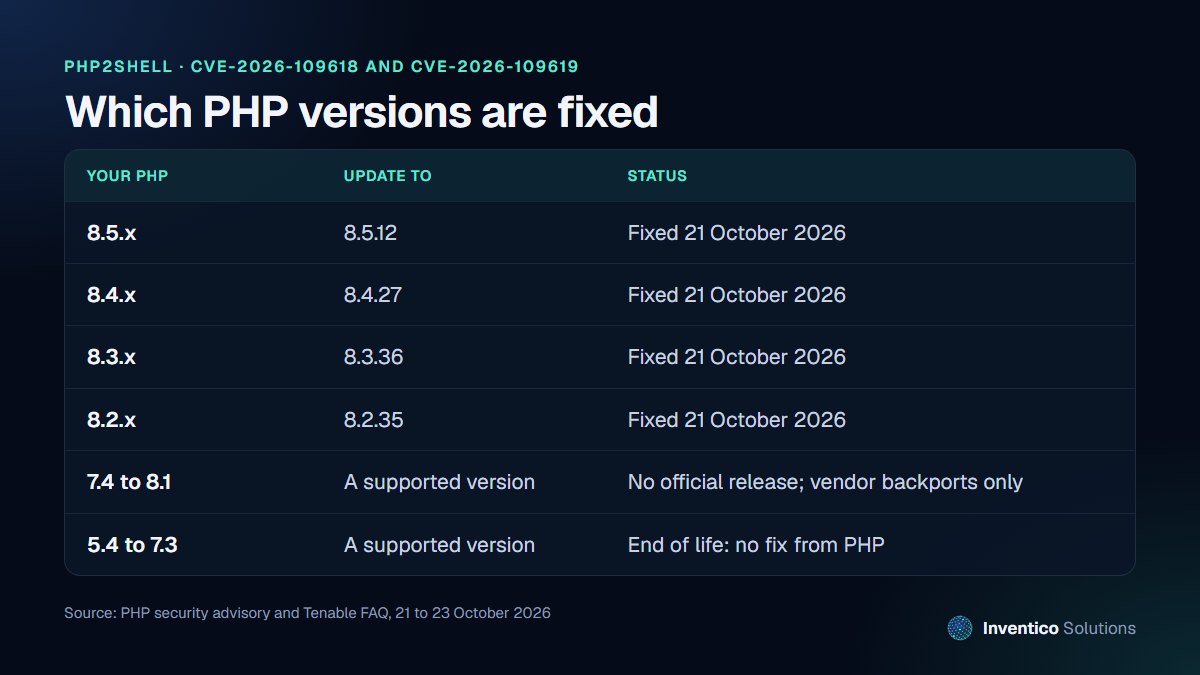
How to check your PHP version
- WordPress: go to Tools, then Site Health, then the Info tab, and open the Server section. It shows your PHP version.
- Hosting control panel: cPanel, Plesk and most managed hosts show the PHP version under PHP settings or "Select PHP version".
- Command line: run
php -von the server. If you use PHP-FPM, check the version each pool actually runs, as a server can have several installed.
Then compare it with the table above.
What if I am on an older version?
The fixes were released for the four supported branches only. For PHP 7.4 to 8.1 there is no official release, only minimal source backports from the PHP security team, so check whether your Linux distribution or hosting provider has shipped a patched build. PHP 5.4 to 7.3 is end of life and receives no fix from the project. In both cases the safe answer is to move to a supported version. The US Cybersecurity and Infrastructure Security Agency (CISA) advises organisations still running PHP 8.1 or earlier to take PHP-based systems offline until they are updated.
Not just websites
PHP is often hidden inside other products: content systems, shops, intranets, booking tools and even network appliances. CISA recommends an inventory of all systems running PHP, including instances embedded in other software, and the UK's National Cyber Security Centre (NCSC) advises watching for updates from vendors whose products bundle PHP.
What to do today
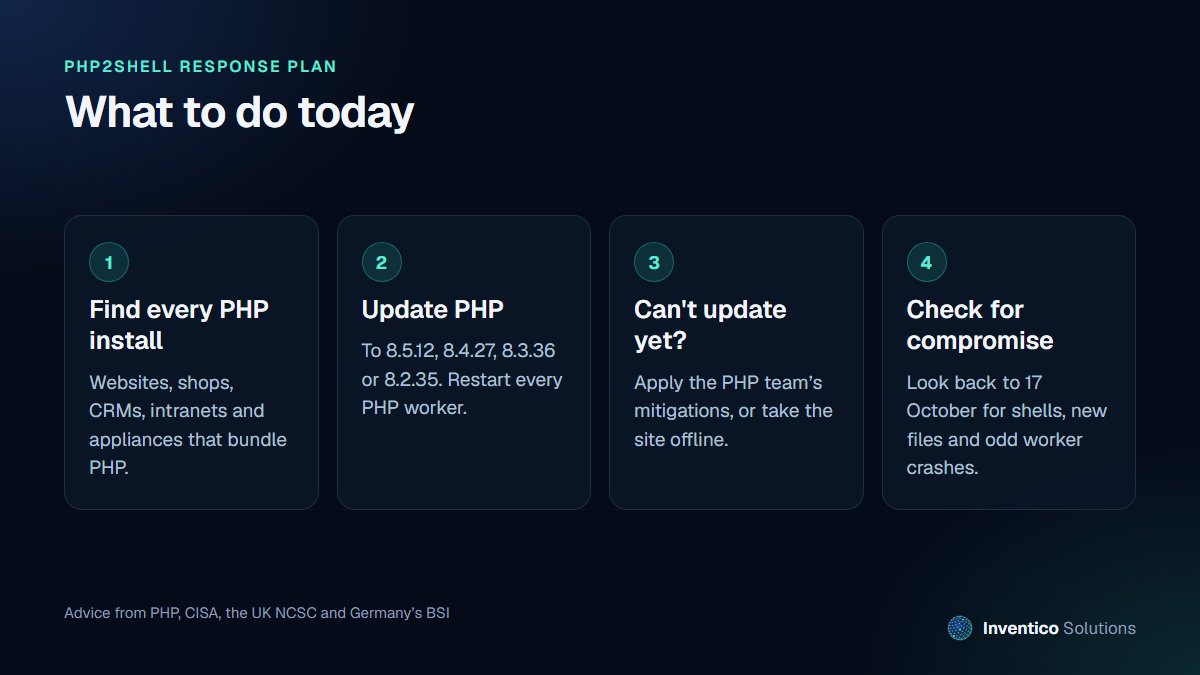
1. Update PHP
Move to 8.5.12, 8.4.27, 8.3.36 or 8.2.35, then restart every PHP worker so the new version is actually running. On shared hosting, your provider controls this: check their status page or ask them directly whether PHP has been patched. The NCSC advises prioritising internet-facing systems first, then internal ones.
2. If you cannot update today
The PHP advisory lists temporary mitigations that reduce exposure, but it is clear that "there are no complete mitigations, updating is the only safe choice". They include:
- setting
session.upload_progress.enabled=0inphp.inior the server configuration (not throughini_set()or.user.ini), then restarting every worker - on PHP 8.5, also setting
fatal_error_backtraces=0
A web application firewall can help in the meantime. Cloudflare and other providers have published rules, though they only protect traffic that passes through them. If you cannot apply mitigations quickly, both CISA and the NCSC advise taking the system offline until it is fixed. That is a hard call for an online shop, but a compromised server costs far more than a few hours offline.
3. Check for signs of compromise
Patching closes the door but does not remove anyone already inside. The NCSC advises assessing systems for evidence of compromise before or alongside the upgrade, and Tenable notes that Amazon recommends looking back to 17 October. Signs to look for, based on the CISA and Wiz guidance:
- PHP worker processes launching shells or downloading tools
- new or changed PHP files you did not upload, especially in upload folders
- bursts of HTTP 500 errors or memory-limit errors in your logs, or unusually large session cookies
- new admin users in WordPress or your CMS
If you find any of these, treat it as an incident: take the site offline, keep the logs, restore from a clean backup taken before 17 October where possible, and change all passwords and keys.
What this means for businesses in the UK, US and EU
Regulators expect you to keep systems that hold personal data secure. A breach through a known, patched vulnerability is hard to defend. In the UK, the ICO says that if a breach is likely to put people at risk, you must report it as soon as possible, and where feasible within 72 hours; EU data protection authorities apply the same 72-hour rule under the GDPR. Keep a short record of what you checked, when you patched and what you found. It is useful evidence however this turns out.
The wider lesson is that AI is shortening the gap between a fix being published and attacks starting. Sites that are patched within days, not months, and that have tested backups, are the ones that come through events like this cleanly.
Kurz auf Deutsch: PHP2Shell-Sicherheitslücke
Das BSI stuft die PHP-Schwachstellen CVE-2026-109618 und CVE-2026-109619 als kritisch ein (Stufe 3 / Orange). Betroffen sind laut BSI alle PHP-Versionen. Aktualisieren Sie auf PHP 8.5.12, 8.4.27, 8.3.36 oder 8.2.35 und starten Sie alle PHP-Worker neu. Ältere Versionen ab 8.1 und darunter erhalten keine offizielle Korrektur. Ist ein Update nicht sofort möglich, sollte die Website bis zur Aktualisierung vom Netz genommen werden.
Frequently asked questions
01.Is WordPress affected by PHP2Shell?
Yes, if it runs on an unpatched PHP version. The flaw is in PHP, not WordPress, and Wiz demonstrated an attack against the latest WordPress image. Updating WordPress itself does not fix it; PHP must be updated.
02.Does my hosting company fix this for me?
On shared and managed hosting, usually yes, because the host controls PHP. Do not assume it has happened: check your PHP version against the fixed releases, and ask your host to confirm in writing.
03.Is updating PHP enough?
Updating closes the vulnerability, but it does not undo an attack that happened before you patched. Check for signs of compromise from 17 October onwards, as the NCSC and Amazon recommend.
If you would like us to check your website, update PHP safely and look for signs of compromise, our cybersecurity and backups team can help today. For ongoing protection, our managed maintenance keeps PHP, plugins and backups up to date, or contact us for urgent help.


