
How Much Does a Mobile App Cost? A Small Business Budget Guide
There is no single price for an app, but there are clear cost drivers and predictable running costs. Here is how to budget for both.

How much a mobile app costs for a small business depends mainly on how many platforms it runs on, how many features it has, and whether it needs its own back end and admin system. The cost to build a business app for iOS and Android is lowest when a focused first version is built from one codebase, and far higher for two separate native apps with payments, chat and offline mode. When you set your budget, include store fees, hosting, platform updates and improvements every year, not just the initial build.
What drives the price of an app?
Two apps that look similar on a phone screen can differ in cost several times over. These are the drivers that make the difference.
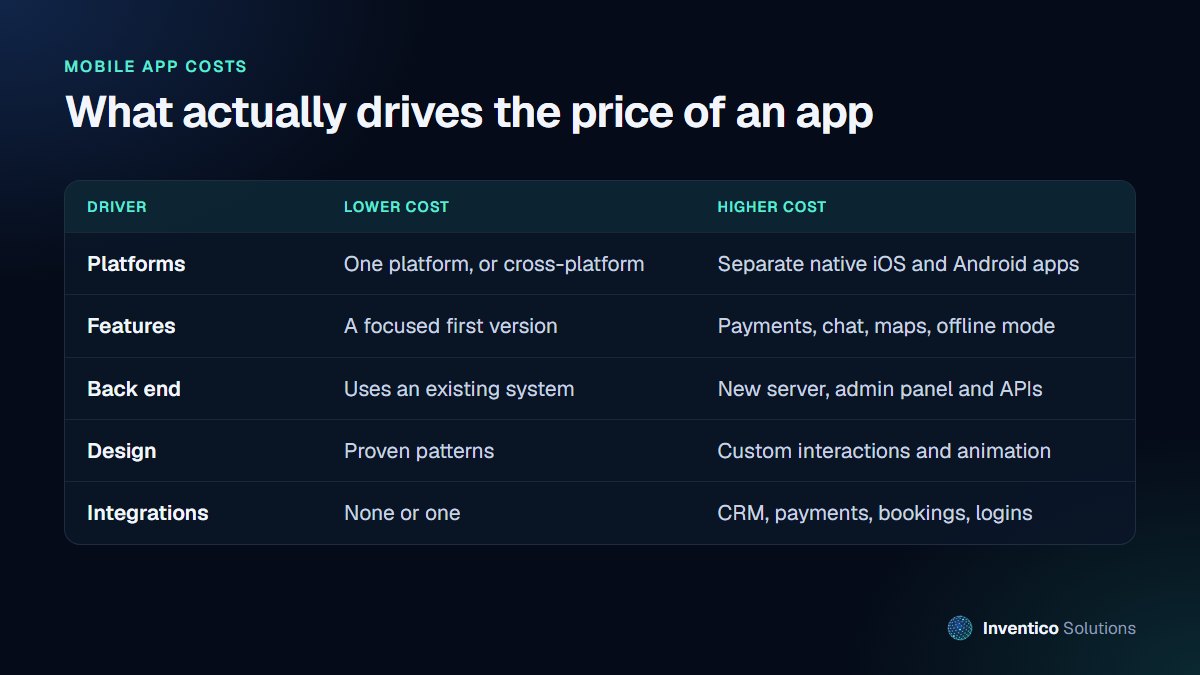
Platforms
You can build one app that runs on both iPhone and Android using a cross-platform framework, or build separate native apps for each. Cross-platform is the usual choice for business apps because one codebase means one build and one set of updates. Separate native apps make sense when you need the very best performance or deep use of device features.
Features
Every feature adds design, development and testing time. Features that typically add the most are:
- in-app payments and subscriptions
- messaging or chat
- maps, location tracking and routing
- offline mode with syncing
- user roles, such as customers, staff and managers seeing different screens
A good first version does one job very well. You can add the rest once real users show you what they need.
Back end and admin
Most business apps need a server behind them: somewhere to store accounts, orders or bookings, and an admin panel for your team. If you already have a system, such as a booking platform or a website with an API, the app can use it and the cost falls. If everything must be built new, the back end can cost as much as the app itself. If your current system has no API, read our guide on integrating software that has no API.
Design and integrations
Proven interface patterns are quicker to build and easier for users. Custom animation and interactions cost more. Each integration, whether a CRM, payment provider, booking system or single sign-on, adds work to build and to maintain.
The fixed fees to publish
Publishing an app has small, predictable fees:
- Apple: the Apple Developer Program costs $99 a year to publish apps on the App Store.
- Google: Google Play charges a one-time registration fee of US$25.
Both stores also take a commission when you sell digital goods or subscriptions inside the app. Physical goods and services, such as a meal order or a booked appointment, are handled differently. We explain the rules in do Apple and Google take a cut of app payments.
The running costs after launch
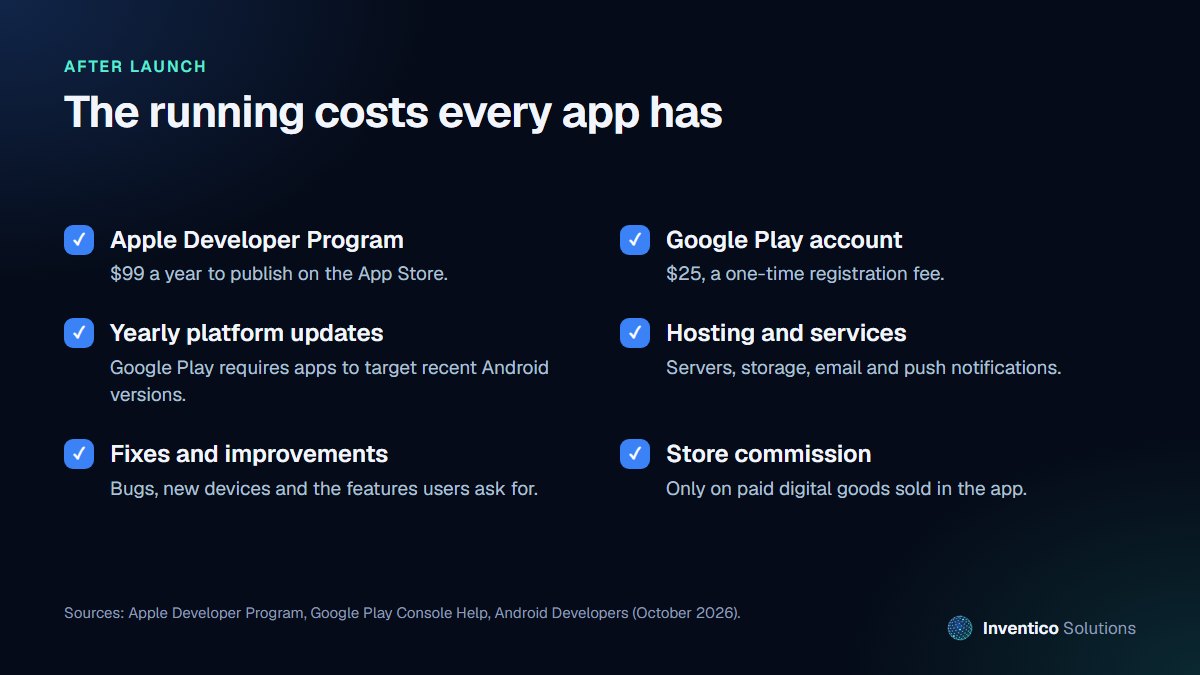
This is the part most budgets miss. An app is not finished at launch.
Platform updates are required
Apple and Google release new versions of their operating systems every year, and the stores raise their requirements to match. Google's target API level requirement is a clear example: from 31 August 2026, new apps and updates must target Android 16 (API level 36) or higher, and existing apps that target older versions become unavailable to new users on newer devices. An app nobody updates slowly disappears from the people you want to reach.
Hosting and services
Servers, databases, file storage, email delivery and push notifications all have monthly costs that grow with usage.
Fixes and improvements
New phones, new screen sizes and real-world use will surface bugs. Users will also ask for features. Budget a regular amount for maintenance rather than treating every change as a new project. A support agreement with the team that built the app is usually the simplest way to do this, because they already know the code and can make changes quickly.
How long does it take to build an app?
Time follows scope in the same way as cost. A typical project moves through five stages:
- Discovery: agreeing who the app is for, the main job it does and what the first version includes.
- Design: screens and user flows, tested with a clickable prototype before any code is written.
- Build: the app and its back end, delivered in stages you can try on your own phone.
- Testing: on real devices, including older phones and smaller screens, with your staff or a few customers.
- Store review: Apple and Google review apps before they appear in their stores, so allow time for their checks and any changes they ask for.
A focused first version moves through these stages much faster than an app that tries to do everything at once. The most common cause of delay is not development itself but decisions: unclear requirements, late changes to the design, or waiting for content and accounts. Agreeing scope early and keeping one person responsible for decisions on your side saves weeks.
How to set a budget for a business app
A realistic app budget covers the first version and its first year, not just the build. Work through it in this order:
- List what the first version must do. Three to five core screens or tasks is a typical first release. Everything else goes on a later list.
- Choose your platforms. One cross-platform codebase covers both iPhone and Android, which is usually the biggest single saving.
- Get quotes against the same written scope. Prices only compare fairly when every developer is quoting for the same features (see how to compare quotes below).
- Add the fixed fees and a year of running costs. Include the store fees above, hosting and services, and time for updates and fixes.
- Keep some budget back for changes. Testing with real users nearly always turns up improvements, so leave room for them rather than spending everything on the first build.
- Plan in phases. Budget for version one now and fund later features from what you learn once people are using it.
If the budget doesn't stretch to an app, a fast, mobile-friendly web app can often do the same job first, without store fees.
How to keep the cost down without cutting corners
- Start with the job, not the feature list. Write down the single most valuable thing the app does for a customer or your staff, and build that first.
- Use what you already have. An existing booking system, shop or CRM can often be the app's back end.
- Go cross-platform unless you have a specific reason not to.
- Ask whether it should be an app at all. For some needs, a fast, mobile-friendly website or web app does the job without store fees or app updates.
- Plan the first year of running costs before you commit, so the app does not stall after launch.
How to compare quotes
Quotes vary widely, so compare like with like. A useful quote should state:
- which platforms are included and how they are built
- the features in the first version, in plain language
- whether the back end and admin panel are included
- who owns the code and the store accounts
- what happens after launch: support period, maintenance options and costs
If a quote is much lower than the others, check which of these is missing.
Frequently asked questions
01.Is it cheaper to build one app for both iPhone and Android?
Usually, yes. A cross-platform app shares one codebase, so you design, build and update it once. Separate native apps can be worth it for demanding performance or device features, but cost more to build and maintain.
02.What does it cost each year to keep an app running?
At minimum, the Apple Developer Program fee of $99 a year, plus hosting and services. Most apps also need regular updates to meet store requirements and fix issues, so plan a yearly maintenance budget from the start.
03.Do I need an app, or will a website do?
If customers use it occasionally, a fast mobile website is often enough. An app earns its place when people use it regularly, need notifications, or need device features such as the camera or location.
If you are planning an app and want an honest view on scope and running costs before you commit, see our app development services or book a free consultation.


