
Custom Software vs Off-the-Shelf: How Small Businesses Should Decide
Buy for the common, build for what sets you apart. A practical way to decide, with the costs and risks of each route explained.

For most small businesses, the right answer is to buy off-the-shelf software for common tasks such as accounts, payroll and email, and to build custom software only for the work that sets you apart, where no product fits how you operate. Off-the-shelf tools are cheaper and quicker to start; custom software costs more upfront but fits your process, can be cheaper over time as you grow, and puts you in control of what changes. The decision comes down to fit, total cost over several years, and control.
The short comparison
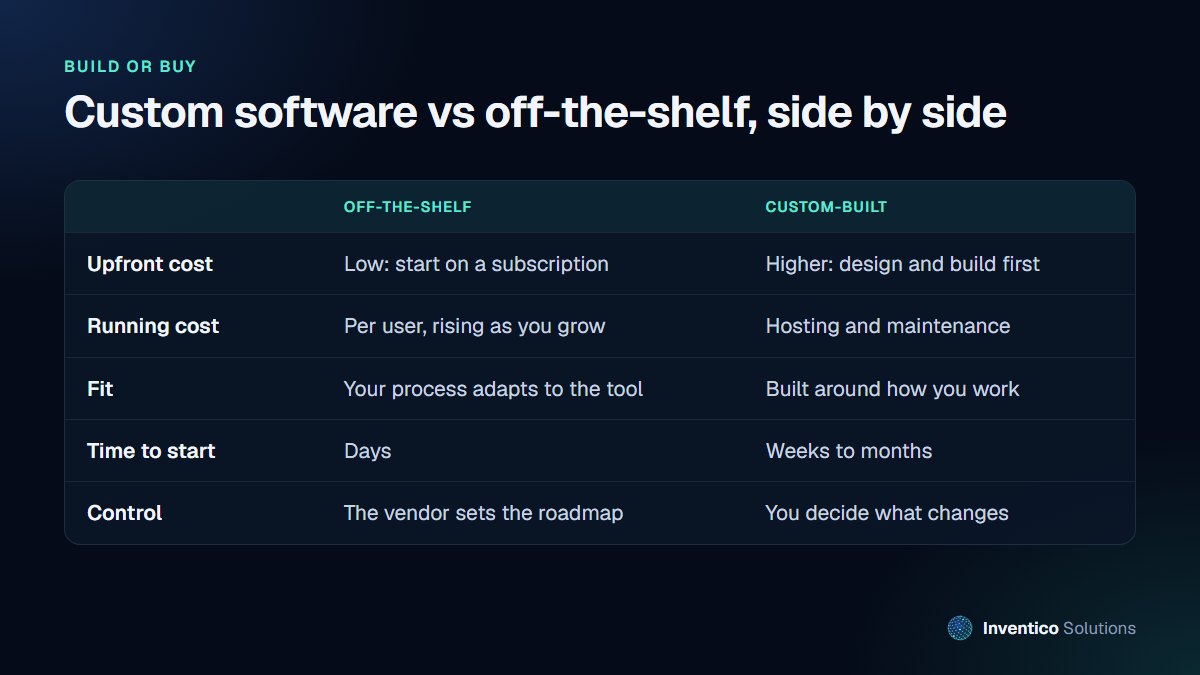
Neither route is better in general. They suit different problems.
When off-the-shelf software is the right choice
Buy a ready-made product when:
- the task is common. Accounting, payroll, email, file storage and video calls are solved problems with excellent products.
- your process can follow the tool. If adapting your way of working costs you nothing important, a product's built-in process may even improve it.
- you need it this week. A subscription can be running in days.
- the cost stays reasonable as you grow. Per-user pricing is fine for a team of five, but check what it costs at twenty or fifty.
The GOV.UK Service Manual on choosing technology takes the same view for government services: reuse existing components where you can, and work out what you need to build and what you can buy or get for free. It is sensible advice for any organisation.
When custom software is worth it
Build when:
- the work is how you win business. A quoting process, a client portal or a service that competitors cannot easily copy deserves software that fits it exactly.
- you are paying for several tools that do not talk to each other, and staff spend hours copying data between them.
- per-user subscription costs keep rising as you hire, for features you barely use.
- the products you have tried fit about half of what you need, and the workarounds cost more time than they save.
- you need control of your data and of when the system changes.
Custom does not have to mean building everything. Often the best result is a small custom system in the middle that connects the off-the-shelf tools you already like.
Think in total cost, not price
The upfront price is the least useful number to compare. Work out the cost over three to five years:
Off-the-shelf: subscription per user per month, multiplied by your expected headcount each year, plus paid add-ons, integration tools, and the staff time spent on workarounds.
Custom: design and build, plus hosting, maintenance and improvements each year.
The GOV.UK Service Manual advises teams to minimise total cost of ownership, and links it to avoiding lock-in: steering clear of long contracts tied to specific tools, keeping full control of your data and using open standards. Those principles protect a small business too. Whichever route you choose, make sure you can export your data in a usable format and that you understand what leaving would involve.
A simple build-or-buy test
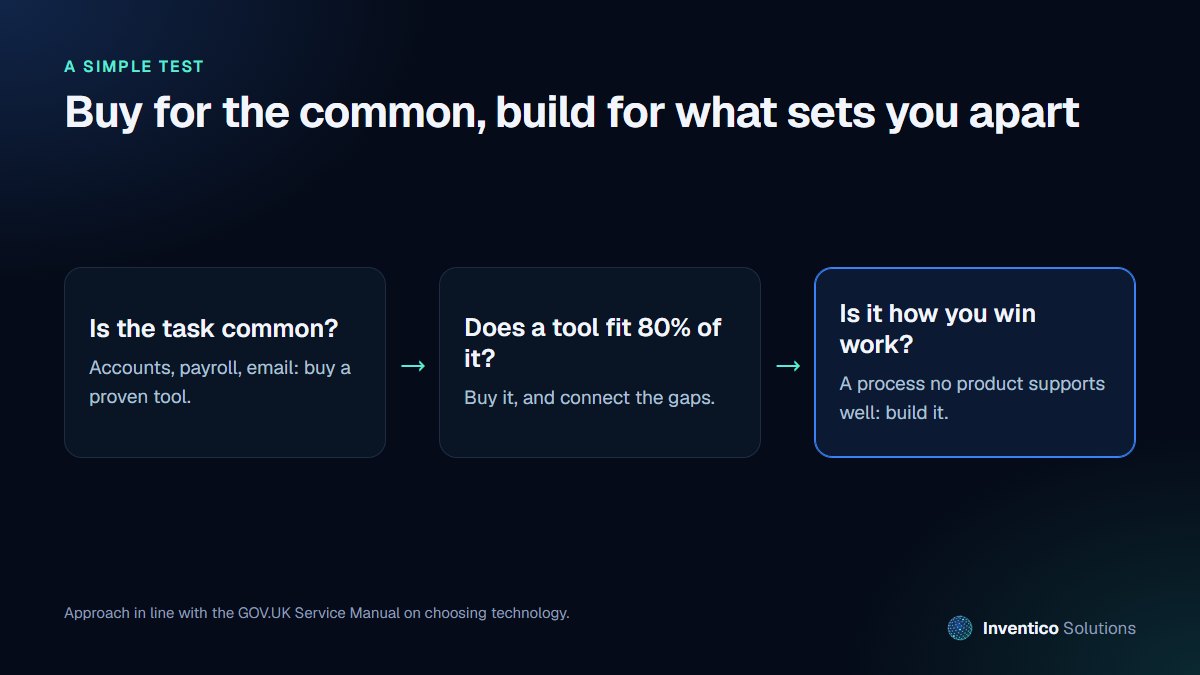
Ask three questions, in order:
- Is the task common? If thousands of businesses do it the same way, buy.
- Does an existing tool fit about 80% of it? Buy it, and connect or automate the gaps.
- Is this process how you win or keep customers? If no product supports it well, build it.
The risks of each route, and how to manage them
Off-the-shelf risks
- The vendor changes prices, removes a feature or is acquired.
- Your data sits in someone else's system with limited export options.
- Your roadmap waits on theirs.
Manage these by checking export options before you sign, avoiding long contracts where you can, and keeping a record of which tools hold which data.
Custom software risks
- A poorly scoped project runs over time and budget.
- The system depends on one developer who then leaves.
- Security is treated as an afterthought.
Manage these by starting with a small first version that solves one painful problem, insisting that you own the code and have access to it, and asking how your supplier handles security. The government's Software Security Code of Practice sets out 14 principles that software vendors are expected to implement, which makes a good checklist of questions.
Questions to ask before commissioning custom software
If the test points towards building, these questions will tell you whether a supplier, and the project, are set up to succeed:
- What is the smallest first version that solves the main problem? A good answer names a specific outcome, not a long feature list.
- Who owns the code, and where will it live? You should have access to the repository and the hosting accounts, not just a login to the finished system.
- How will we see progress? Expect working software at regular milestones that you can try, rather than a single reveal at the end.
- What happens after launch? Ask about support, maintenance, hosting and how changes are priced.
- How is our data protected and backed up? Ask about access control, encryption, backups and how quickly the system can be restored.
- What does it connect to? List the tools it must exchange data with, and check each one has a way to do it.
Clear answers to these questions matter more than the lowest quote. A cheap build that you cannot maintain or change becomes the most expensive option within a year or two.
What a sensible first custom project looks like
The best first projects are narrow and measurable. For example:
- a client portal that replaces email chains with one place for documents, approvals and invoices
- a quoting tool that turns a two-hour spreadsheet exercise into ten minutes
- a dashboard that pulls bookings, payments and stock from three systems into one view
Each saves time every week, and each can grow later. That is a far safer start than replacing every system at once.
Frequently asked questions
01.Is custom software only for large companies?
No. Small businesses often benefit most, because a focused tool that fits their process can save several hours a week per person. The key is to start small and solve one real problem first.
02.How long does custom software take to build?
It depends on scope. A focused first version, such as a portal or an internal tool, typically takes weeks to a few months. Larger systems are best delivered in stages so you use and improve each part as it arrives.
03.Who owns custom software once it is built?
That depends on your contract, so agree it in writing before work starts. We cover the details in who owns my website after a developer builds it, and the same principles apply to software.
If you are weighing up whether to build or buy, we are happy to look at your process and give you a straight answer, even when it is "buy". Read about our custom software development or get in touch.


